まずは下準備。FBにアプリケーション登録をする。登録画面には、iOSはあるもののOS X用のアプリケーションを登録する場所がない。とりあえず「ネイティブiOSアプリ」を選択しておいて問題ないようだ。次にBundle IDを作成するアプリケーションと同じにしておく。次に詳細設定でApp Typeを「Native/Desktop」にApp Secret in Clientを「いいえ」にする。これで終了。
今まで一度もFBのアプリは作ったことがないのでイマイチ手順が分からないが、とりあえず何かをリクエストしてみる。
	ACAccountStore *accountStore = [[ACAccountStore alloc]init];
	ACAccountType *accountType = [accountStore accountTypeWithAccountTypeIdentifier:ACAccountTypeIdentifierFacebook];
	NSDictionary *options = [NSDictionary dictionaryWithObjectsAndKeys:@"取得したAppID",ACFacebookAppIdKey,
					[NSArray arrayWithObjects:@"publish_stream",@"publish_actions",nil],ACFacebookPermissionsKey,nil];
	[accountStore requestAccessToAccountsWithType:accountType options:options completion:^(BOOL granted, NSError *error) {
		if(granted){
			NSArray *accounts = [accountStore accountsWithAccountType:accountType];
			ACAccount *anAccount = [accounts lastObject];
			NSLog(anAccount: %@,[anAccount description]);
		}else{
			NSLog(@"error: %@",[error description]);
		}
	}];
結果は、
The Facebook server could not fulfill this access request: The app must ask for a basic read permission at install time.”
インストールした直後はまず、基本情報のパーミッションをリクエストしないといけないようだ。(install timeってそういうことでいいのかな?)
調べてみると、FBアプリは何の情報の読み書きするかによって、パーミッションが細かく分かれているようだ。
では、ACFacebookPermissionsKey の値を@”email”にして再度リクエスト。これでアクセスできた。
次になにか書き込んでみる
上記を踏まえて、一旦emailでリクエストした後、投稿可能なパーミッションで再度リクエストしてみる。
ACAccountStore *accountStore = [[ACAccountStore alloc]init];
ACAccountType *accountType = [accountStore accountTypeWithAccountTypeIdentifier:ACAccountTypeIdentifierFacebook];
NSMutableDictionary *options =
	[NSMutableDictionary dictionaryWithObjectsAndKeys:@"取得したAppID",ACFacebookAppIdKey,
	[NSArray arrayWithObjects:@"email",nil],ACFacebookPermissionsKey,
	ACFacebookAudienceOnlyMe,ACFacebookAudienceKey,nil
];

[accountStore requestAccessToAccountsWithType:accountType options:options completion:^(BOOL granted, NSError *error) {
	if(granted){
		NSArray *postPermissions = [NSArray arrayWithObjects:@"publish_stream",@"publish_actions", nil];
		[options setObject:postPermissions forKey:ACFacebookPermissionsKey];
		[accountStore requestAccessToAccountsWithType:accountType options:options completion:^(BOOL granted, NSError *error) {
			if(granted){
				NSArray *accounts = [accountStore accountsWithAccountType:accountType];
				ACAccount *anAccount = [accounts lastObject];
				NSString *urlStr = [NSString stringWithFormat:@"https://graph.facebook.com/%@/feed",[[anAccount valueForKey:@"properties"] valueForKey:@"uid"]];
				NSURL *url = [NSURL URLWithString:urlStr];
				NSDictionary *params = [NSDictionary dictionaryWithObject:@"Hello FB." forKey:@"message"];
				SLRequest *request = [SLRequest requestForServiceType:SLServiceTypeFacebook requestMethod:SLRequestMethodPOST URL:url parameters:params];
				[request setAccount:anAccount];
				[request performRequestWithHandler:^(NSData *response, NSHTTPURLResponse *urlResponse, NSError *error){
					NSLog(@"response:%@",[[NSString alloc]initWithData:response encoding:NSUTF8StringEncoding]);
				}];
			}else{
				NSLog(@"error post:%@",[error description]);
			}
		}];
	}else{
		NSLog(@"error:%@",[error description]);
	}
}];
うまくいったようだ。

FB上でアプリの使用を削除したり、Mac上でアプリからの書き込みを許可しなかったりすると、その後まったくアクセスを受け付けなくなることが何度かあった、帰ってくるエラーも様々。

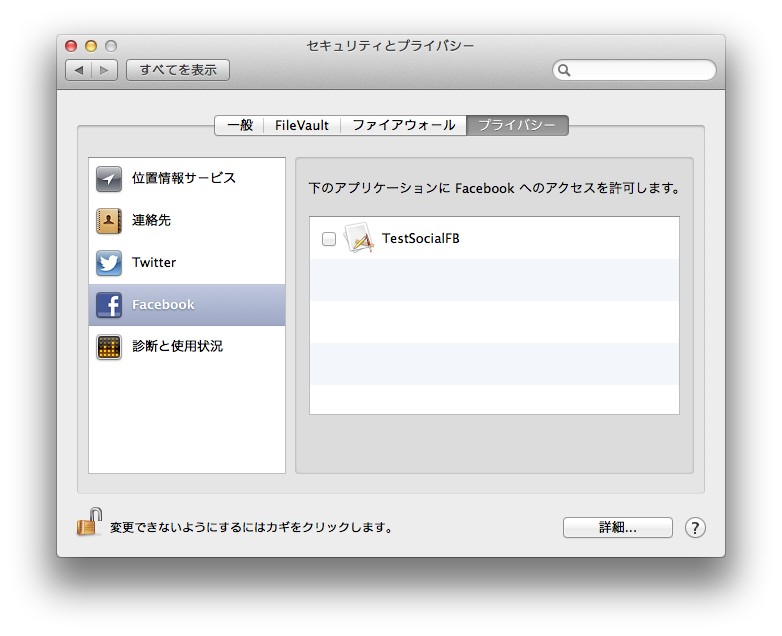
どこかに再度許可をチェックするところがあるのではと探すと、「環境設定:セキュリティーとプライバシー:プライバシー」にあった。(たぶん。)
一旦、チェックを外して再度チェックすると、聞いてきた。これでFB側の登録アプリにも再度追加された。
このあたりもう少し突っ込まないといけない感じ。
